AI Token Economics
AI cost attribution: see what your tokens cost and who spent them
Glassity reads how many tokens your AI is using and what they cost, puts that next to your cloud billing data in FOCUS format, and lets you ask about both through the Glassity FinOps Agent.
Read-only access EU-hosted We never store prompt content

 Data held in AWS eu-west-1, Ireland
What AI token economics does in Glassity
Glassity connects to the AI gateway or cloud AI service your engineers already use, imports token counts and cost every hour, and shows them on the AI Usage page grouped by source, key, model and provider. Each night the same usage is written as FOCUS rows into the data lake that holds your cloud billing data, so the Glassity FinOps Agent and the open-source FOCUS MCP can query cloud spend and AI spend together.
What you can see on the AI Usage page
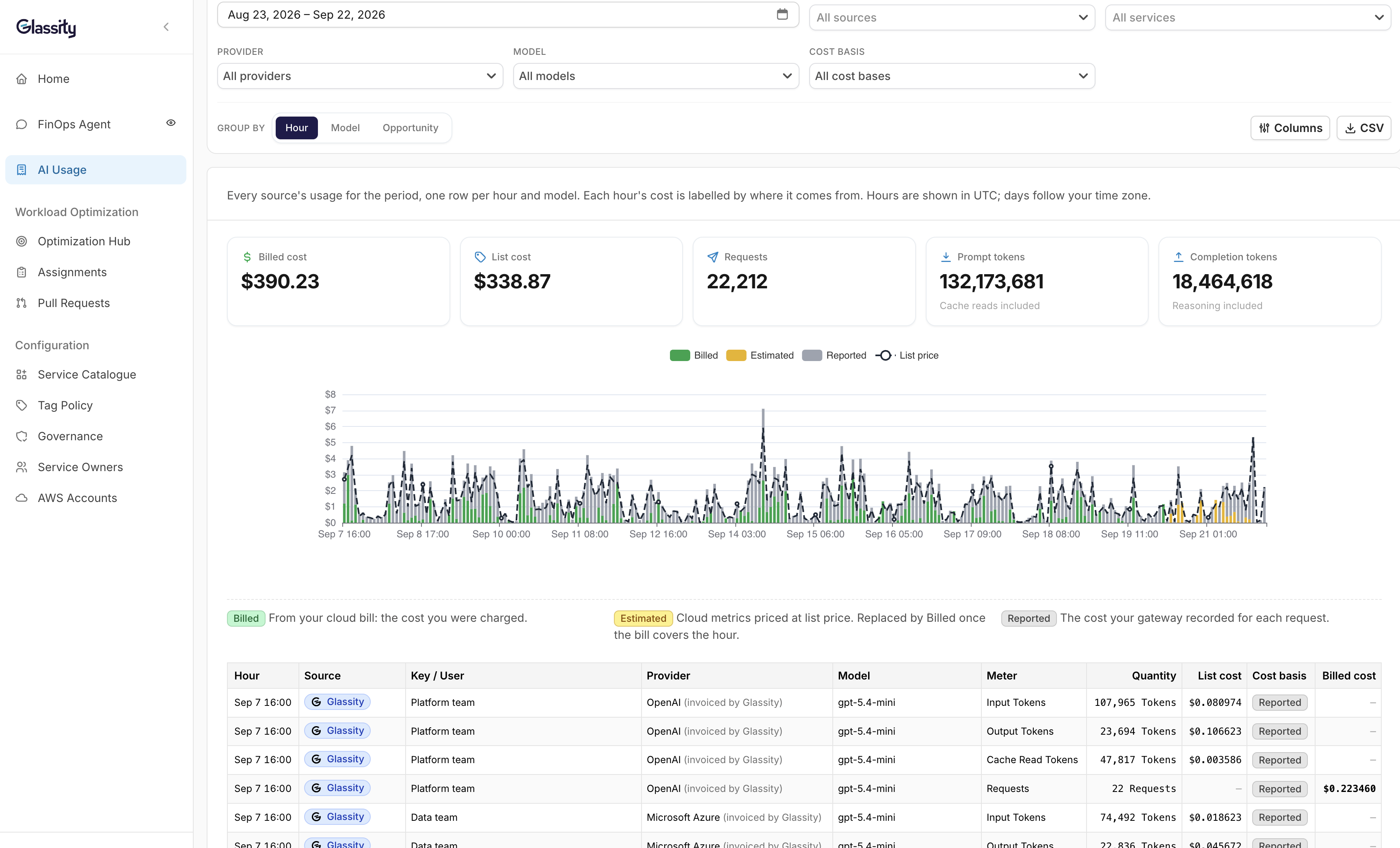
The AI Usage page shows token counts and cost per source, updated hourly.
Token classes are counted separately, wherever the source reports them. Input, output, cache read, cache creation and reasoning. LiteLLM, Helicone and Bifrost report all of them. Cloudflare AI Gateway reports input and output. Amazon Bedrock reports input and output from the bill, and also cache reads and writes if you add the optional CloudWatch role. Reasoning tokens never come from Bedrock. Cache and reasoning tokens are where AI cost quietly grows, and most teams can’t see them at all, because the invoice reports one total.
Every cost is labelled by where it comes from. Billed means it comes from your cloud bill, the amount you were charged. Estimated means cloud metrics priced at list price, replaced by the billed amount once the bill covers that hour. Reported means the cost your gateway recorded for each request.
You can group by hour, model or opportunity, and filter by source, service, provider, model and cost basis. Grouping by opportunity shows what the Glassity FinOps Agent spent in AI on each piece of work. Any view can be downloaded as a CSV.
Grouping depends on what each source carries. Gateway connections bring their own dimensions with them:
| Source | What you can group by |
|---|---|
| LiteLLM | Team id, end user, request tags, spend-log metadata |
| Helicone | User id (Helicone groups by user), custom properties, prompt id |
| Bifrost | Custom metadata sent as request headers |
| Cloudflare AI Gateway | Gateway id, request type, and user if your app sends the metadata header |
| OpenRouter | Key and model |
| Amazon Bedrock | Account, region, model |
| Microsoft Foundry | Account, region, model |
Only one gateway, LiteLLM, has a team field, and no field is shared by all of them. If you want team attribution everywhere, name your keys or tags consistently and Glassity will group by them.
Read more: How to attribute AI costs to teams when there is no team field
Value for AI
For the cloud waste fixes the Glassity FinOps Manager makes on its platform, Glassity will tell you exactly what those tokens were spent on and what value was delivered.
Glassity FinOps Manager is the agentic platform that does the actual work: it finds waste across your cloud infra, routes each finding to the service and its owner, and ships the fix as a pull request your engineers review.
Each token spent on this work is tied to the specific problem it helped find or fix, so you can see what value the spent AI tokens have generated.
This only covers the remediation work done through Glassity FinOps Manager. For your teams’ own AI usage, Glassity shows the cost and who spent it. Run your waste discovery and remediation through Glassity, and for every fix it makes, you’ll know your value for AI.
Read more: How Glassity FinOps Manager finds and fixes cloud waste
Where Glassity reads your AI usage from
Glassity groups AI usage sources into Managed by Glassity, Gateways and Cloud AI services. All three land on the same AI Usage page and the same FOCUS dataset.
Managed by Glassity. Our own gateway, which meters the Glassity FinOps Agent. It appears in every account so you can see what the agent itself costs you. For the work the Agent does, you also see what it cost in AI next to what it saved on your bill. It is also how we keep ourselves honest.
Gateways. LiteLLM, Helicone, OpenRouter, Cloudflare AI Gateway, Bifrost. Read from the gateway’s own logs or API: token counts by class where the gateway reports them, request count, and the cost the gateway recorded, hourly per key or user and model.
Cloud AI services. Amazon Bedrock and Microsoft Foundry. Read from your cloud bill and live metrics: tokens and cost per account, region and model. No key, team, user or tag, because the bill does not carry them.
Gateway or direct: what each gives you
| Gateways | Cloud AI services | |
|---|---|---|
| Token counts | All five classes from LiteLLM, Helicone and Bifrost. Input and output from Cloudflare AI Gateway | Input and output. Bedrock adds cache reads and writes with the optional CloudWatch role. No reasoning tokens |
| Attribution | Per key or per user, plus the gateway’s own fields | Account, region, model |
| First data | Within the hour | Bedrock: from the bill, about 36 hours behind. Live counts within minutes with the optional CloudWatch role. Foundry: live metrics in about 20 minutes |
| Cost | Reported: the cost the gateway recorded | Bedrock: billed cost from the bill, estimated at list price until the bill covers the hour. Foundry: estimated at list price until you add an Azure cost export, then billed cost |
If your engineers already route model calls through something, Glassity reads it. If they call Amazon Bedrock directly, Glassity reads your AWS bill instead.
Read more: Why your Amazon Bedrock bill has token counts but no owner
How often the data updates
Your AI usage appears on the AI Usage page within an hour of happening. Once a night, the same usage is written into the FOCUS data lake, where the Glassity FinOps Agent and the FOCUS MCP can query it alongside your cloud billing data.
- 01
Verify. You paste credentials. Glassity checks it can read.
- 02
Preview. You see real usage before anything is imported. Walk away if it looks wrong.
- 03
Connect. You choose how far back to import. For Amazon Bedrock, that can be every month of AWS billing data already in Glassity. For gateways, it’s whatever history the gateway still keeps: LiteLLM for as long as you set it to, Bifrost 90 days by default, Helicone 7 to 90 days depending on your plan, OpenRouter about a year, Cloudflare AI Gateway about a week. If your gateway keeps a short history, connect it soon.
- 04
Hourly. The AI Usage page refreshes with tokens and cost per source, key, model and provider.
- 05
Nightly. FOCUS export into the lake. The Agent and the MCP read it from the next morning.
Which is fresher
The AI Usage page is hourly. The FOCUS lake, which is what the Glassity FinOps Agent reads, is up to a day behind. Bedrock bill hours settle about 36 hours after the fact, and the optional CloudWatch role fills that gap with live counts within minutes, priced from list until the bill settles.
How Glassity writes token counts into FOCUS
Glassity writes AI usage as FOCUS 1.4 rows and puts the token counts in standard columns that the specification already has.
Each kind of token that was used and has a price gets its own usage row. SkuMeter is one of Input Tokens, Output Tokens, Cache Read Tokens, Cache Creation Tokens or Reasoning Tokens. PricingQuantity is the token count. ListCost comes from the vendor rate card.
One more row, Requests, carries the cost exactly as the gateway reported it. It also holds the number of requests in the hour, at a price of zero, because no vendor charges per request. Glassity doesn’t spread the gateway’s cost across the token rows, because the gateway doesn’t say how much of it belongs to each token type, and any split would be a guess.
So there are up to six rows per hour for each key, model and piece of work: one per kind of token, plus one carrying the cost. A piece of work can be, for example, an opportunity the Glassity FinOps Agent was working on.
Custom fields follow the FOCUS x_ convention: x_GatewaySourceId, x_SourceDimensions for the gateway’s own team, user and tag fields, and x_UnpricedTokens for tokens Glassity doesn’t have a list price for yet, so their list cost shows as zero.
Glassity deliberately doesn’t use draft 1.5 names. The 1.5 draft gives these token types named fields of their own. Once 1.5 is ratified, moving over should be a mapping step, not a rebuild.
For Amazon Bedrock the bill already meters in tokens: each line’s meter says input or output, and the quantity column is the count, in millions for Marketplace models and thousands for AWS’s own. Glassity turns those into tokens per model, account, region and hour. With the optional CloudWatch role, cache reads and writes are added for that account.
Glassity’s CEO sits on the FinOps Foundation’s FOCUS working group.
Read more: How we put token counts into FOCUS 1.4 without waiting for 1.5
Ask the Glassity FinOps Agent about cloud and AI spend together
The Glassity FinOps Agent already runs SQL over your FOCUS lake for cloud billing questions. AI usage is written into that lake as its own dataset, so the same questions work on it, and the agent can add the two together when your naming connects them.
- What changed in our AI costs last week?
- Which key or team spent the most on reasoning tokens in August?
- Total spend for checkout, cloud and Bedrock together, last quarter.
- Cost per million output tokens by model, this month against last.
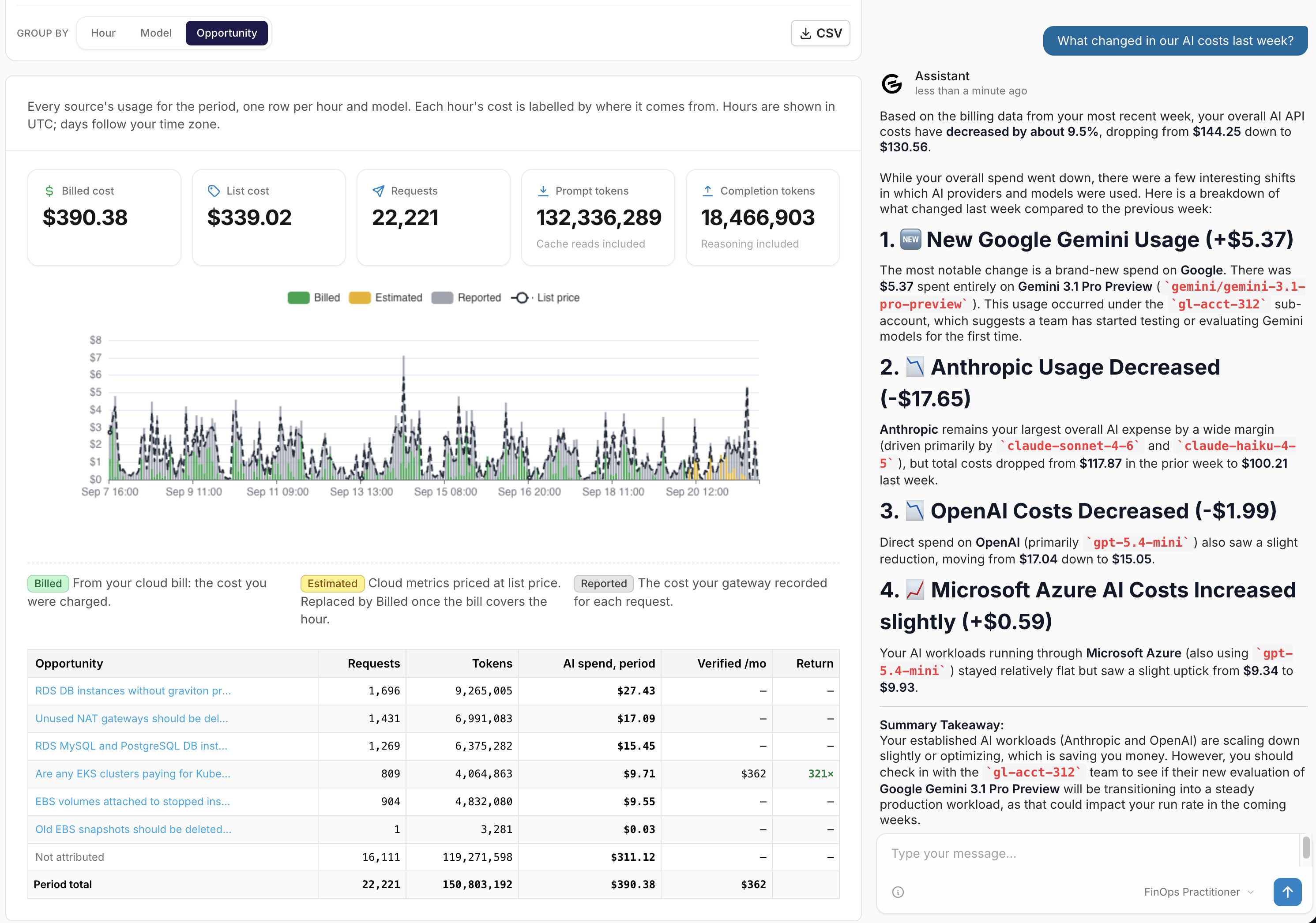
Important. Cross-dataset answers depend on your own naming; there is no built-in link between a gateway key and a cloud service. And the lake is nightly, so the agent’s answer can be a day behind the AI Usage page.
FOCUS MCP. If you already use Glassity’s open-source FOCUS MCP with Claude or another client, the token rows and x_ columns are readable today. No separate release.
Free tier, read-only, fifteen minutes. No card and no call.
What Glassity cannot do yet
- Cloud AI sources have no “who”. Amazon Bedrock and Microsoft Foundry attribute to account, region and model. A team calling Bedrock directly from one account gets one bucket. Route through a gateway if you need keys.
- Gateways need a public HTTPS endpoint. Private and VPC-internal hosts are rejected at save.
- Direct provider APIs are not a source. Calls straight to OpenAI, Anthropic or Google appear only if they go through a supported gateway or a cloud AI service.
- Not every source reports every token type. Reasoning tokens come only from LiteLLM, Helicone and Bifrost. Cloudflare AI Gateway and Microsoft Foundry report input and output. Amazon Bedrock reports input and output, plus cache reads and writes with the CloudWatch role.
- The lake is nightly. The page is hourly; the agent’s cross-dataset answers can be a day behind.
- Automatic export to your own storage is not available yet. You can download any view as a CSV, and query the data through the Glassity FinOps Agent and Glassity’s FOCUS MCP.
What Glassity stores, and where
Glassity stores hourly aggregates of your AI usage: token counts by class, request count and cost, per key or user, model and provider, plus the gateway’s own dimensions. It never stores prompt or response content.
Data lives in Glassity’s database and as FOCUS files in a data lake in AWS eu-west-1, Ireland. Glassity is ISO 27001 certified.
What we ask for, per source. All read-only, encrypted at rest.
| Source | Credentials |
|---|---|
| LiteLLM | Gateway URL and master key |
| Helicone | API key |
| OpenRouter | Management key |
| Cloudflare AI Gateway | API token with gateway read, account id, gateway id |
| Bifrost | Gateway URL, admin username and password |
| Amazon Bedrock | The payer role already connected for your bill. Optional CloudFormation stack creating a role limited to cloudwatch:GetMetricData and cloudwatch:ListMetrics |
| Microsoft Foundry | An Entra app with Monitoring Reader on the Foundry resource. Optional: an Azure cost export, for billed cost instead of estimated |
What is AI token economics?
Token economics, or tokenomics, is the practice of managing the cost and value of AI model usage, measured in the tokens models are billed in. The Tokenomics Foundation, a Linux Foundation project, frames it as three questions: how the AI is produced, how it is consumed, and what value it returns.
Consumption is the part that looks most like established cost management: allocation, forecasting and optimisation, applied to AI instead of servers. That is where Glassity sits today.
Tokens are the most visible and easily metered part of AI spend, not all of it. The rest sits in the system around the model, and in the cloud infrastructure that system runs on.
This is not the cryptocurrency meaning of the word. In AI, tokenomics refers to the units models are metered in, and is unrelated to the Web3 use of the term.
Read more: What is AI token economics?
FAQ
See what’s in your AI bill
Check what your tokens cost and who spent them.
Read-only access EU-hosted We never store prompt content