Glassity Blog
AI cost attribution is now available in Glassity
From today, you can see how many tokens your AI uses, what they cost, and which team, key or service spent them. The numbers update every hour. They sit next to your cloud billing data, and you can ask the Glassity FinOps Agent questions about both. It's available now on the free tier.
Table of contents
Why we built it
Over the last year, many companies gave their teams free access to AI. Some teams built real things with it. Others asked the same model to redo the same task again and again. All of it used tokens, and all of it landed on the same bill.
Most companies we talk to have two groups looking at this. The FinOps team knows how to split cloud costs between teams, but their tools can't read tokens. The engineers understand tokens very well, but what they know never reaches the reports finance uses.
So two simple questions go unanswered. Which team spent this AI budget? And how much did a service cost last month, including the AI it used?
What's in the release
You can connect seven sources, all read-only. Five are gateways: LiteLLM, Helicone, OpenRouter, Cloudflare AI Gateway and Bifrost. Two are cloud AI services: Amazon Bedrock and Microsoft Foundry. There's also our own managed gateway, which shows what the Glassity FinOps Agent itself costs you. And for the work the Agent does, you see what it cost in AI next to what it saved on your bill.
Before you connect anything, you see a preview of your own usage. If it looks wrong, you close the tab. Nothing is imported until you say so.
After that, the AI Usage page updates every hour. You see tokens and cost by source, key, model and provider.
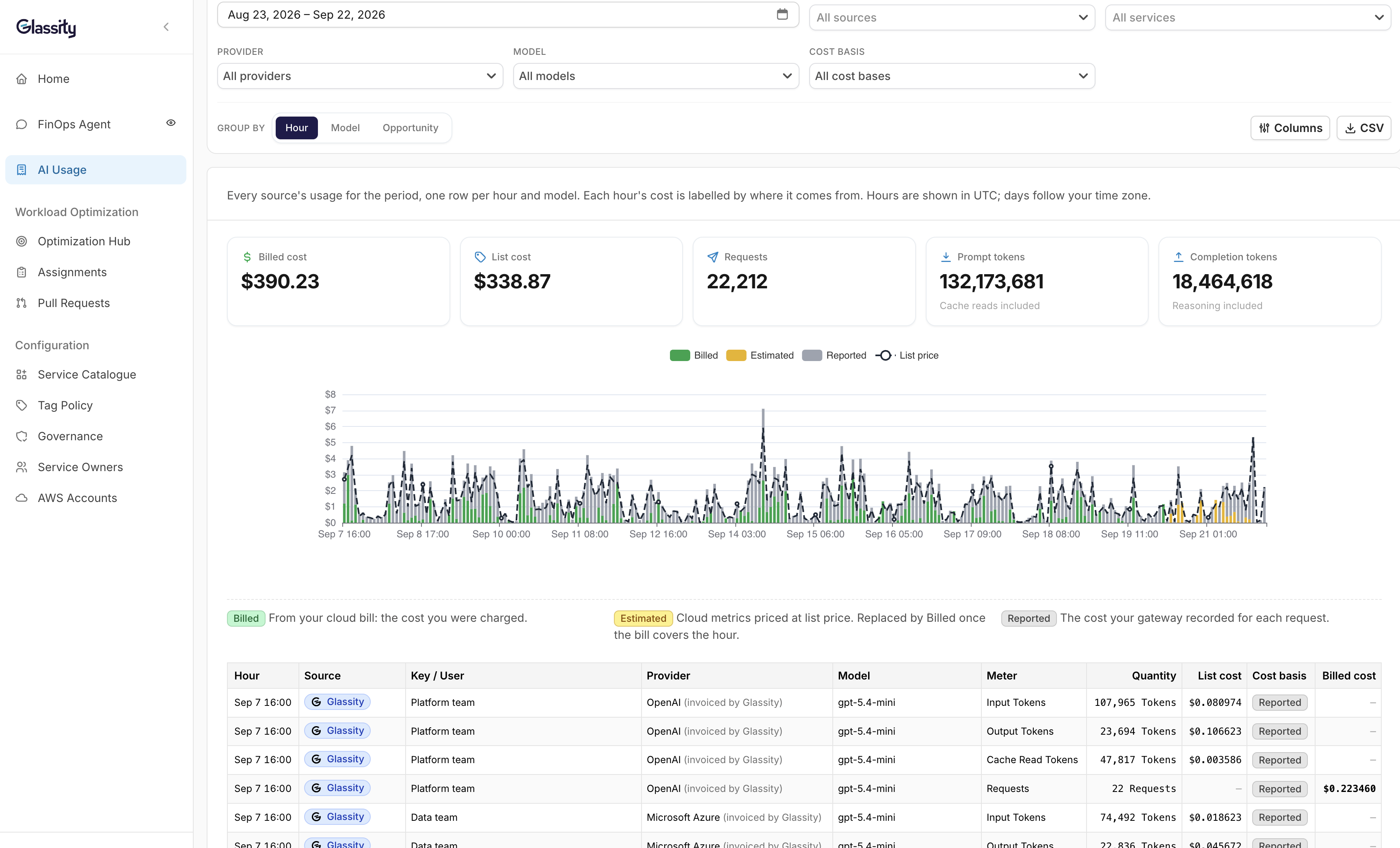
Input, output, cache and reasoning tokens are counted separately wherever the source reports them. LiteLLM, Helicone and Bifrost give you the full breakdown. Cloudflare AI Gateway reports input and output only. For Amazon Bedrock, the bill gives input and output. If you add Glassity's read-only CloudWatch role to an account, that account also reports cache reads and writes, every hour. Bedrock doesn't report reasoning tokens either way.
This matters because cache and reasoning tokens often grow without anyone noticing, and one total on an invoice won't show you that.
Every night, the same data is written in FOCUS format. FOCUS is the standard format cloud providers use for billing, so your AI costs and your cloud costs end up in one place, in one format. The technical detail is on the product page.
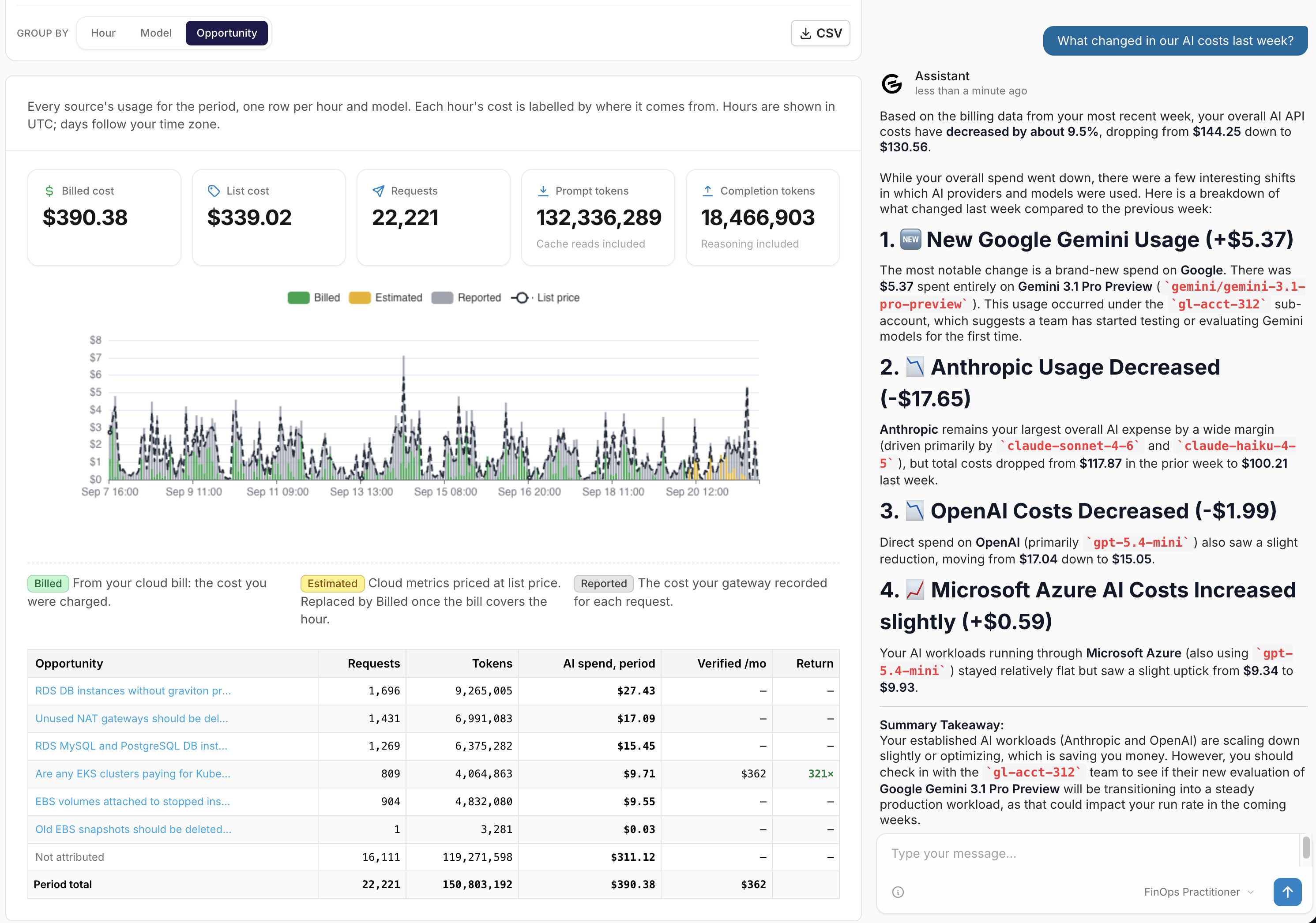
The Glassity FinOps Agent can answer questions about both, in plain language:
“What changed in our AI costs last week?”
“Which team spent the most on reasoning tokens in August?”
“What did the checkout service cost last quarter, cloud and AI together?”
We only store hourly totals: token counts, request counts and cost. We never store your prompts or the model's responses. The data is kept in AWS eu-west-1, in Ireland, and we are ISO 27001 certified.
Connect your account and see your own numbers.
Free tier, read-only, fifteen minutes.
Why a gateway makes a difference
It's worth knowing this before you connect.
If your engineers send AI requests through a gateway, you get detail per key or per user, depending on the gateway. LiteLLM gives you the key, plus team id, end user and request tags. OpenRouter gives you the key and model. Bifrost gives you the key, plus any custom metadata. Helicone groups by user id, and adds custom properties and prompt id. Cloudflare AI Gateway gives you gateway id and request type, and detail per user if your app sends the metadata header.
If they call Amazon Bedrock or Microsoft Foundry directly, you still get token counts, but only by account, region and model. You won't see which key, team or person made the request. A team calling Bedrock from one account shows up as one line.
For Bedrock, the cost is what your AWS bill says. For Foundry, the cost is estimated from list prices until you add an Azure cost export. After that, it's your billed cost too.
Only one gateway, LiteLLM, has a team field, and no field is shared by all of them. If you want to see costs by team everywhere, name your keys or tags after your teams, and Glassity will group by them.
What it doesn't do yet
- For your teams' own AI use, we can show you what it costs and who spent it, but not yet what it gave you back.
- Automatic export to your own storage isn't available yet. For now, you can download any view as a CSV, or reach the data through the Glassity FinOps Agent and our open-source FOCUS MCP.
- Your gateway needs to be reachable over HTTPS from the internet. Gateways kept inside a private network aren't supported yet.
- Direct calls to OpenAI, Anthropic or Google aren't a source. They only show up if they go through a supported gateway or a cloud AI service.
- The Glassity FinOps Agent reads from the FOCUS data lake, which updates once a night. The AI Usage page updates every hour. So the Agent's answers can use data up to 24 hours older than what you see on the AI Usage page.
One thing you can do now
Look at how your API keys are named.
If they're called prod-key-1 and test-2, no tool will tell you which team spent what. If they're named after teams or projects, the answer is already in your data.
It costs nothing, and it's the most useful thing most teams could do about AI costs today.
How much history you get
When you connect a source, you choose how far back to import.
For Amazon Bedrock, you can import every month of AWS billing data you already have in Glassity, because Bedrock usage comes from your bill. If your AWS billing export is new, AWS can fill in earlier months on request.
Gateways keep less history, and how much depends on the gateway. LiteLLM keeps logs for as long as you set it to. Bifrost keeps 90 days by default. Helicone keeps 7 to 90 days, depending on your plan. OpenRouter keeps about a year. Cloudflare AI Gateway keeps about a week. Glassity imports whatever is still there.
So if your gateway only keeps a short history, like Cloudflare's week, it's worth connecting soon, before older usage is gone.
Bedrock numbers run about a day and a half behind the bill. Gateway usage appears within the hour.
How to start
Connecting takes about fifteen minutes. You need a read-only key for your gateway, or you can use the AWS account you already connected for Bedrock. You'll see a preview of your usage before anything is imported. There's no card and no call.